Device help: Activate eSIM
Activate your eSIM for iPhone: Upgrade
Choose one of the options below, depending on iPhone version.
DETAILED STEPS
Option 1: iPhone 12 and older
1. Visit www.firstnet.com/activate and follow instructions
2. Remove physical SIM from the SIM slot (using paperclip or SIM tool).
3. Turn the device on
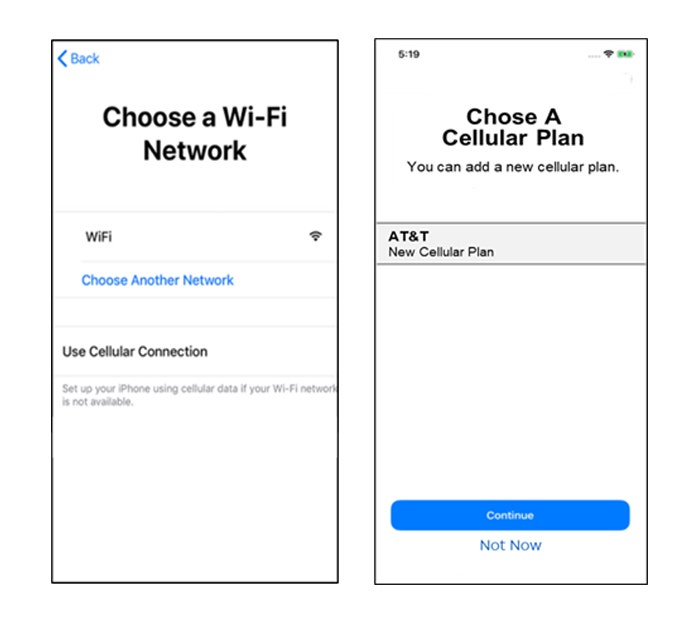
4. Connect to Wi-Fi on the “Choose a Wi-Fi Network” screen
5. Follow the device prompts
6. Continue to follow device setup prompts
7. Select FirstNet – New Cellular Plan, press Continue
8. When your device setup is complete, lock the screen, and verify your FirstNet Service is active (you should see “FirstNet” at the top left of your Lock Screen)
Option 2: iPhone 13 and newer
1. Remove physical SIM from the SIM slot (using paperclip or SIM tool).
2. Turn on device
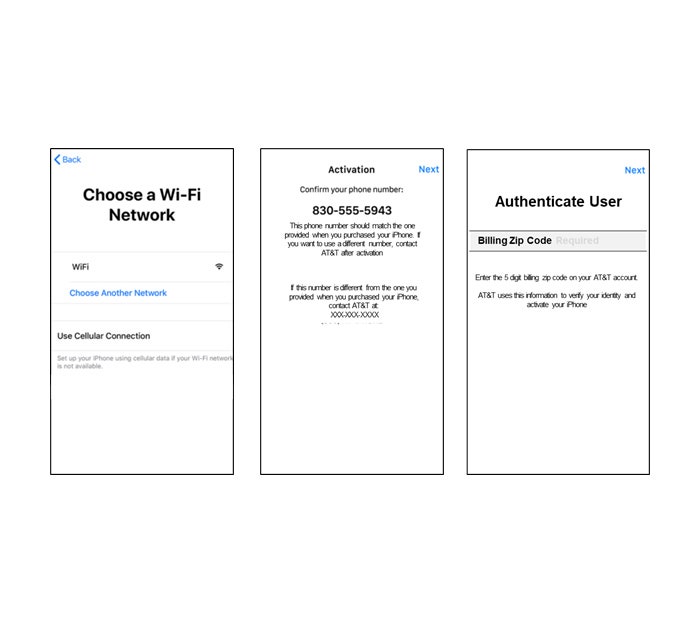
3. Connect to Wi-Fi on the “Choose a Wi-Fi Network” screen
4. On the Activation screen confirm your phone number and select Next
5. On the Authenticate User screen enter Billing or Shipping Zip Code and select Next
6. eSIM download and activation occur seamlessly on the device
7. When your device setup is complete, lock the screen, and verify your FirstNet Service is active (you should see “FirstNet” at the top left of your Lock Screen)
If you still cannot get the eSIM to download after following the steps above, please call FirstNet Support 800-574-7000.