Device help: Activate eSIM
Activate your eSIM for iPhone: New line of service during initial setup
DETAILED STEPS
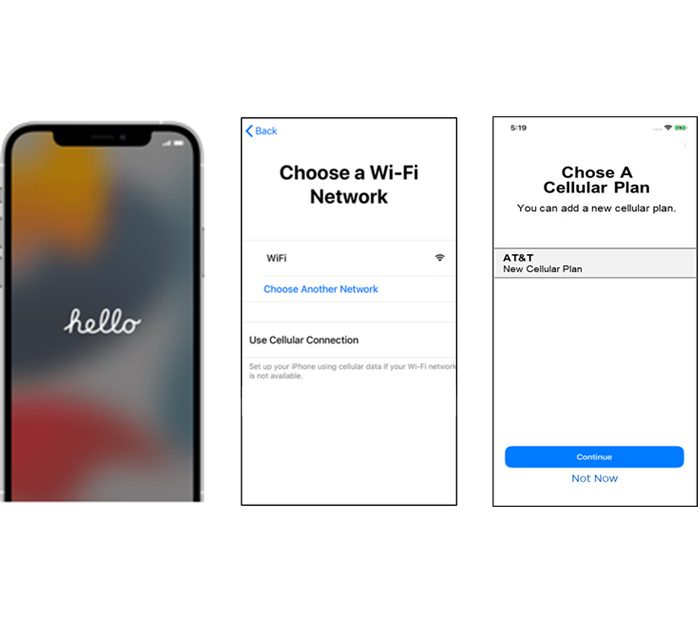
1. iPhones operating 15.3 or later do NOT need to remove physical SIM in device, otherwise, remove physical SIM from SIM slot (Use a paperclip or the SIM tool to pop out the tray and remove the physical SIM)
2. Turn on the device
3. Follow the device setup instructions. If setting up from a previous iPhone, recommend to choose Quick Start when prompted. If not setting up from a previous iPhone, select Set Up Manually

4. Connect to Wi-Fi on the “Choose a Wi-Fi Network” screen
5. Continue to follow device setup prompts
6. Select FirstNet – New Cellular Plan, press Continue
7. Continue to follow device setup prompts
8. When your device setup is complete, lock the screen, and verify your FirstNet Service is active (you should see “FirstNet” at the top left of your Lock Screen)
If you still cannot get the eSIM to download after following the steps above, please call FirstNet Support 800-574-7000.
LEARN ABOUT AMERICA'S PUBLIC SAFETY NETWORK
Get connected
By clicking Submit, you consent to AT&T sending you email about FirstNet services, products and offers at the address you provide, even if you have previously opted out of receiving AT&T marketing emails.
By clicking Submit, you consent to AT&T sending you email about FirstNet services, products and offers at the address you provide, even if you have previously opted out of receiving AT&T marketing emails.